You have a .cursor/rules folder full of .mdc files and an mcp.json with a handful of servers, and now you want Claude Code too. Claude Code doesn’t read .mdc rules or Cursor’s mcp.json, so moving Cursor rules to CLAUDE.md is a real conversion, not a copy. This guide maps each piece, shows the built-in importer and the community converters, and covers what to do if you keep using both tools.
Where Cursor and Claude Code keep your setup
Both tools split things into project files (in the repo) and personal files (in your home folder). The names just don’t line up:
| Cursor | Claude Code | |
|---|---|---|
| Project instructions | .cursor/rules/*.mdc, AGENTS.md |
CLAUDE.md or .claude/CLAUDE.md, .claude/rules/*.md |
| Personal instructions | User Rules in Customize → Rules (in the app, not a file) | ~/.claude/CLAUDE.md, ~/.claude/rules/ |
| Project MCP servers | .cursor/mcp.json |
.mcp.json in the project root |
| Your MCP servers | ~/.cursor/mcp.json |
~/.claude.json (user and local scope) |
| Skills | .cursor/skills/, ~/.cursor/skills/ |
.claude/skills/, ~/.claude/skills/ |
Sources: Cursor’s rules, MCP and skills docs, and Claude Code’s memory and MCP docs. Two overlaps help later: Cursor also loads skills from .claude/skills/ and ~/.claude/skills/, and both tools can read a plain AGENTS.md.
How .mdc frontmatter maps to CLAUDE.md
A Cursor project rule is an .mdc file whose frontmatter decides when it applies. Three fields do the work:
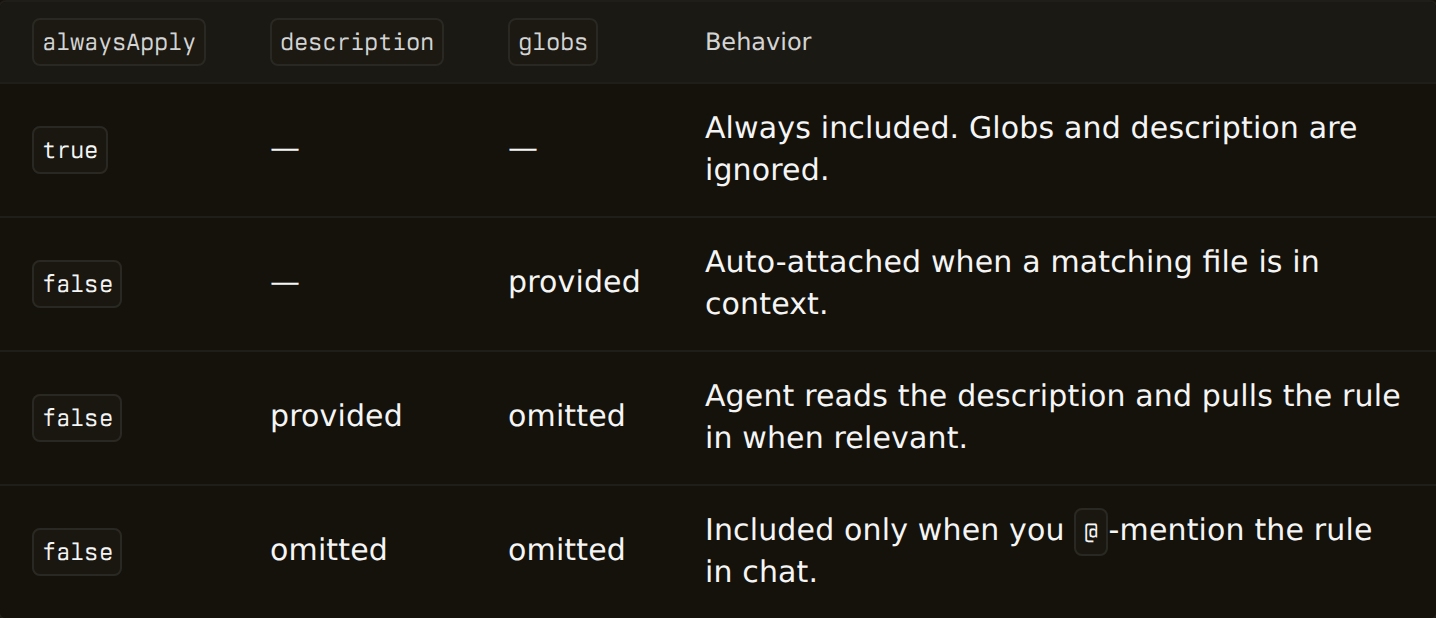
Claude Code has its own rules folder, .claude/rules/, but its frontmatter knows one field. The rule frontmatter reference says paths is the only field Claude Code reads, and any other field is ignored without an error. So the four Cursor rule types land in different places:
| Cursor rule | In Claude Code |
|---|---|
alwaysApply: true |
CLAUDE.md, or a .claude/rules/*.md file without frontmatter (loads at launch) |
globs: src/components/**/*.tsx |
.claude/rules/*.md with paths: set to the same patterns |
description: only (agent decides) |
No rule equivalent. The closest is a skill, which loads when Claude decides it’s relevant |
Neither (manual @ mention) |
A skill you invoke yourself |
Glob syntax carries over: Cursor takes comma-separated patterns, and Claude Code’s paths accepts a YAML list or a comma-separated string. Copying one scoped rule across looks like this:
❯ mkdir -p .claude/rules❯ cp .cursor/rules/components.mdc .claude/rules/components.md# then edit the frontmatter: rename globs: to paths:, delete alwaysApply and descriptionRename every .mdc to .md and drop them into .claude/rules. Claude Code ignores globs, so each scoped rule now loads in every session.
Rename globs to paths in each scoped rule, put always-on rules in CLAUDE.md, and turn description-only rules into skills.
The built-in way: /init and /import
Claude Code ships two ways to bring Cursor setup across, both described in its memory docs:
/initgenerates aCLAUDE.mdfor the project and reads Cursor rules in.cursor/rules/or an old.cursorrulesfile while doing it, keeping the relevant parts./import cursorbrings configuration from Cursor on your machine into Claude Code: instruction files, MCP servers, commands, subagents and skills. Per the commands reference, importing from Cursor needs Claude Code v2.1.265 or later, and it isn’t available on every platform (Amazon Bedrock and Microsoft Foundry among them).
❯ claude# inside the session, preview first; nothing is written/import cursor --dry-run# then run it for real and pick what to bring over/import cursorThe docs call it a one-time copy. Run it once and you have a starting point, but nothing links the two tools afterwards: a rule you edit in Cursor next week stays in Cursor.
Community converters
Before /import existed, people wrote their own. Two that show up when you search for this:
- cursor-rules-to-claude (
npx cursor-rules-to-claude) appends your rules toCLAUDE.md. Rules withalwaysApply: truego in whole; rules with a description are listed as conditional, with a link to the full text. - cursor2claude (
cursor2claude sync) generates or updatesCLAUDE.mdfrom.cursor/rules/, keeps what you wrote below a marker, and has awatchmode that re-syncs when rules change.
Both write into CLAUDE.md, so glob-scoped rules become text Claude reads in every session rather than paths-scoped rules. Both go one way, Cursor to Claude Code. And neither README mentions MCP servers.
MCP servers: the same server in two files
The good news: both tools use the same mcpServers JSON shape, so a server entry from Cursor’s mcp.json reads naturally in Claude Code’s .mcp.json. For a project, copying .cursor/mcp.json to .mcp.json is most of the job. Check two things:
- Variables. Cursor writes
${env:NAME}and also knows${userHome}and${workspaceFolder}. Claude Code’s expansion supports${VAR}and${VAR:-default}, so rewrite those. - Your own servers live in
~/.claude.json, which also holds your sign-in session, so add them with the CLI instead of editing the file:
❯ claude mcp add --env API_KEY=your-key --transport stdio --scope user my-server -- npx -y my-mcp-server# --scope user: available in every project# keep an option between --env and the name, or the name is read as another KEY=value❯ claude mcp listThat’s fine for five servers. The catch comes later: you add a sixth in Cursor and forget Claude Code, and the two files start to drift.
Using Cursor and Claude Code side by side
Many people don’t switch; they keep both. Here’s what can be shared and what can’t:
- Project instructions: one
AGENTS.md. Cursor readsAGENTS.mdin the project root and in subdirectories. Claude Code reads it when there’s noCLAUDE.mdin the working directory or above it, or you add aCLAUDE.mdcontaining@AGENTS.md(details). Plain markdown has no globs, so file-scoped rules still need a copy per tool. - Skills: one folder. Put them in
~/.claude/skills/and Cursor loads them too, per its skills docs. - MCP servers: two files,
~/.cursor/mcp.jsonand~/.claude.json, kept in step by you. - Personal rules: by hand. Cursor’s User Rules live in the app, so copy them into
~/.claude/CLAUDE.mdyourself.
Where SkillPouch fits, and where it doesn’t
SkillPouch (ours) syncs the setup in your home folder between assistants and computers. It’s the right tool for the MCP part of this problem, and not for the rules part.
What it does for Cursor and Claude Code: an MCP server is stored once in your pouch and written to every assistant in its own format, ~/.claude.json for Claude Code and mcp.json for Cursor, changing only the entries SkillPouch added and leaving the rest of each file alone (docs). Add a server once and it reaches your other assistants and computers. Skills go into both skills/ folders and commands into both commands/ folders.
What it doesn’t do: it writes no instructions for Cursor. The docs table says so plainly:
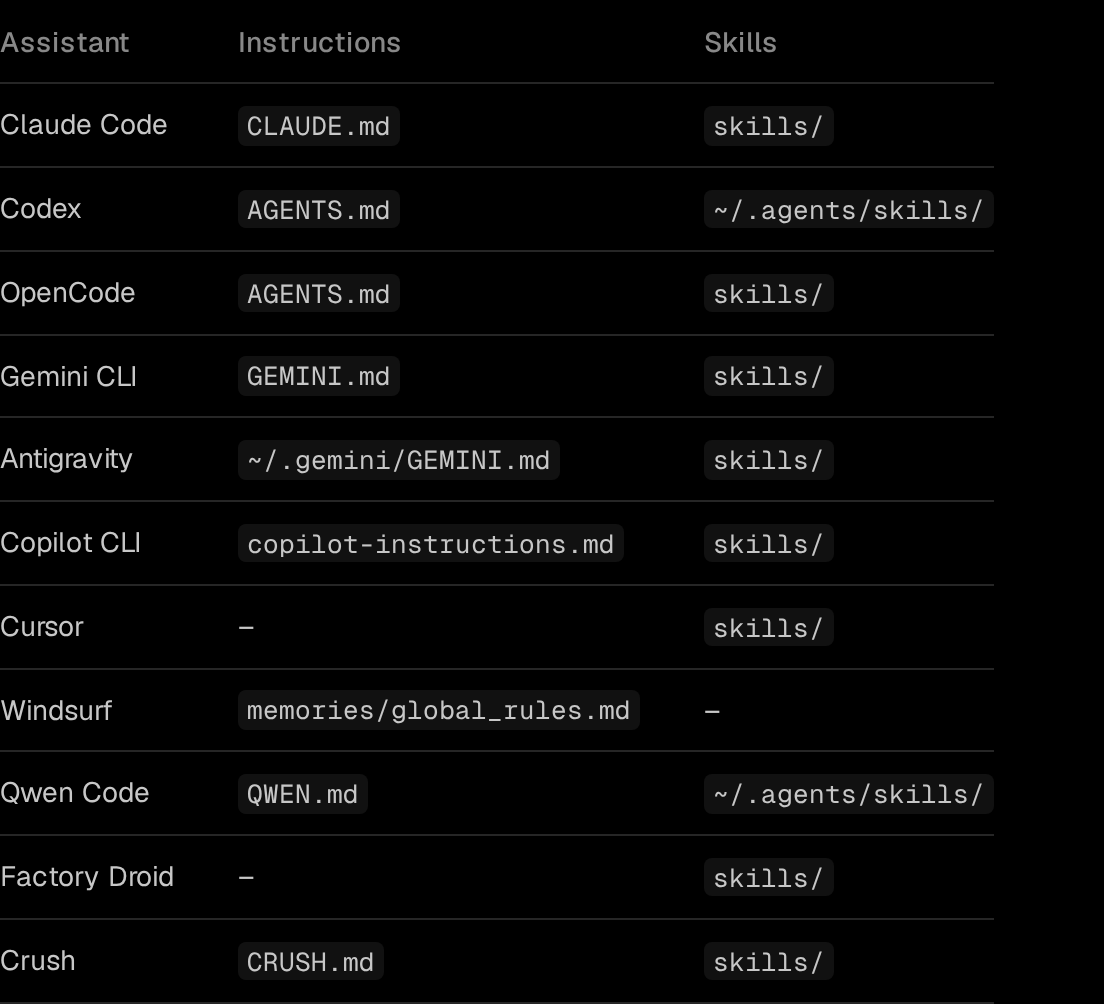
So your .cursor/rules/*.mdc files and Cursor’s User Rules stay yours to manage; project rules belong in the repo anyway. Your ~/.claude/CLAUDE.md does sync to your other computers. Getting started:
- 1
Install and run it
npm i -g skillpouch, then skillpouch. Approve this computer in a browser where you are signed in and unlocked.
- 2
Pick a pouch and assistants
Keep Claude Code and Cursor on. skillpouch select lists what this computer syncs.
- 3
Add MCP servers once
The background sync writes each one into ~/.claude.json and the Cursor mcp.json, on every computer that syncs the pouch.
Checklist after switching
- Run
/contextin Claude Code and check thatCLAUDE.mdand your rules appear under Memory files. - Every former
globs:rule now sayspaths:, and no.claude/rulesfile still hasalwaysApplyordescriptiondoing nothing. claude mcp listshows every server from~/.cursor/mcp.json, and any copied.mcp.jsonuses${VAR}instead of${env:VAR}.- Your Cursor User Rules are in
~/.claude/CLAUDE.md. - If you keep both tools, you know which file is the original for rules, skills and MCP servers.
If you also move between computers, the guide to syncing Claude Code settings covers what in ~/.claude should travel and how.
Try it on your own setup
Free to start, end-to-end encrypted, open source. Two commands and your setup follows you.