Your dotfiles repo already carries .zshrc and .gitconfig, so adding ~/.claude, ~/.codex and ~/.cursor looks like a five-minute job. It isn’t, because those folders mix the config you wrote with login tokens, transcripts and files the assistant rewrites on its own. This guide to dotfiles for AI coding assistants maps which files are safe to put in git and which aren’t, then shows where Stow, chezmoi and cloud folders hold up and where they break.
Why AI assistant config isn’t like .zshrc
A shell config is a file you write and nothing else touches. An assistant’s home folder is shared between you and the program, and three problems follow from that:
- Secrets sit inside config files. An MCP server that needs a token usually gets it from an
envblock, in the same file as the rest of your setup:~/.cursor/mcp.jsonfor Cursor,~/.codex/config.tomlfor Codex,~/.claude.jsonfor Claude Code. - State files never stop changing. Claude Code writes every prompt to
history.jsonland every session to a transcript underprojects/. The Claude Code docs say these aren’t encrypted at rest, and that anything passing through a tool lands in a transcript, including a credential a command printed. Codex saves session transcripts tohistory.jsonlby default as well, per its history persistence docs. - Some files hold per-machine paths. Codex’s config reference has
projects.<path>.trust_levelentries keyed by a project’s absolute path, and a Mac and a Linux box disagree about where home is.
Codex’s own docs say it keeps its local state under CODEX_HOME, which defaults to ~/.codex, and list what lives there. Only the first line is config you’d want on another computer:

Dotfiles for AI coding assistants: the file map
Here is the split for the three folders most people start with. The left column is what you wrote; the right column stays on the computer that made it.
| Assistant | Commit it | Keep it out of git |
|---|---|---|
Claude Code (~/.claude) |
CLAUDE.md, skills/, agents/, commands/, settings.json (check its env block) |
.credentials.json, history.jsonl, projects/, caches, and ~/.claude.json as a whole |
Codex (~/.codex) |
AGENTS.md, prompts/, config.toml (check MCP env values and projects entries) |
auth.json, history.jsonl, logs and caches |
Cursor (~/.cursor) |
mcp.json with ${env:NAME} instead of keys, skills/, commands/, hooks.json, cli-config.json |
Keys typed straight into mcp.json; your User Rules aren’t a file here at all |
A few details the table can’t hold:
~/.claude.jsonsits next to~/.claude, not inside it, and holds your OAuth session, per-project trust decisions, your personal MCP servers and UI toggles, per the Claude Code docs. Only the MCP servers are worth carrying.- Cursor resolves
${env:NAME}and${userHome}insidemcp.json, and its MCP docs say to use environment variables for secrets and never hardcode them. Codex has the same idea inenv_varsandbearer_token_env_var, so the file holds variable names, not values. - Cursor’s CLI configuration docs say some fields in
cli-config.jsonare CLI-managed and may be overwritten, so expect diffs you didn’t make. - Gemini CLI’s
oauth_creds.jsonbelongs in the right column too.
Git and Stow: the simplest setup
GNU Stow is a symlink farm manager: each folder in your repo is a package, and Stow links its contents into the parent of the repo, which is your home folder if the repo is ~/dotfiles. Give each assistant a package that holds only the left column of the table, for example ~/dotfiles/claude/.claude/CLAUDE.md, and stow them:
❯ mkdir -p ~/.claude ~/.codex ~/.cursor# the real folders must exist before you stow (see the warning below)❯ stow claude codex cursor# links each file from claude/.claude/, codex/.codex/ and cursor/.cursor/ into your home folderThis works well for one assistant on two machines. It breaks in three places:
- Secrets. Stow has no encryption. A key in an
envblock is plain text in every clone of the repo, private or not. - Per-machine values. A symlink points every computer at the same bytes, so an absolute path or a work-only MCP server can’t differ between machines.
- Files the assistant rewrites. A program that saves by writing a new file and renaming it over the old one replaces your symlink with a plain file, and your repo stops seeing changes. After the assistant changes a setting, check with
ls -lthat the link is still a link.
Encrypted dotfiles sync with chezmoi and age
chezmoi adds the two things Stow lacks: templates and encryption. With age, a file you add with --encrypt sits encrypted in the repo and is decrypted when you apply it. With templates, one source file renders differently per machine:
❯ chezmoi age-keygen --output=$HOME/key.txt# prints your public key; set encryption = "age" and [age] identity + recipient in ~/.config/chezmoi/chezmoi.toml❯ chezmoi add --encrypt ~/.gemini/.env# stored encrypted in the source repo, decrypted by chezmoi apply❯ chezmoi add --template ~/.codex/config.toml# then replace your home path in the template with {{ .chezmoi.homeDir }}The key file never goes in the repo. Copy it to each computer yourself and back it up somewhere other than the repo: without it, the encrypted files can’t be decrypted on a new machine.
chezmoi can also handle ~/.claude.json, the file you can’t commit whole. A modify_ script receives the file’s current contents and writes the new ones, and the setValueAtPath function changes one key in a JSON or TOML file, so you can manage the MCP servers and leave the session alone:
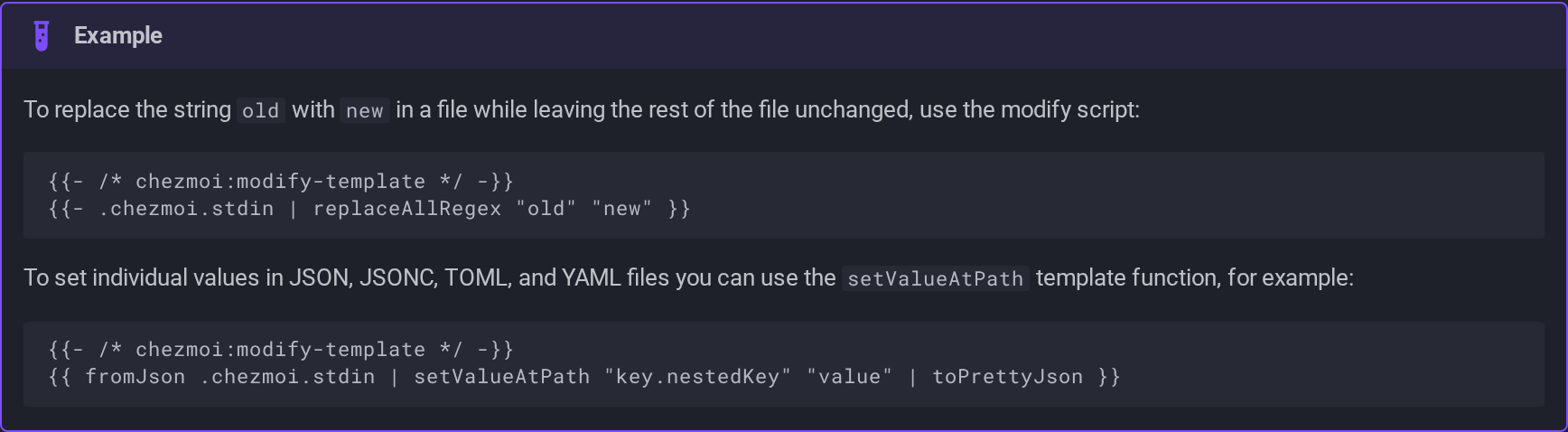
The docs note that on a new machine the file doesn’t exist yet, so the script must write a complete file. And the cost grows with every assistant: the same MCP server is JSON for Claude Code and Cursor and TOML for Codex. One MCP configuration with chezmoi solves that with one manifest and a template per format, which works and is yours to maintain.
Cloud folders: why live config files conflict
Moving ~/.claude into Dropbox, iCloud or a Syncthing folder skips all the setup above, and that’s the trap. A cloud folder syncs whole files whenever they change, and the folder holds files the assistant writes during every session. Two computers with the assistant open write the same history.jsonl, and you can end up with a conflicted copy next to it that nobody tells you about. The whole folder also travels, credentials and transcripts included. Our comparison of git, Syncthing, Dropbox and iCloud for Claude Code shows what each does with a clash.
Symlink ~/.claude into a cloud folder: transcripts and .credentials.json upload with it, and history.jsonl can split into conflicted copies.
Sync only the left column of the file map, keep keys out of plain text, and decide what happens when two machines change the same file.
A purpose-built option: SkillPouch
SkillPouch is ours, so weigh this section with that in mind. It syncs items instead of folders: instructions, skills, agents, commands, MCP servers, hooks, plugins and settings. It never touches the right column of the file map:

How it answers the problems above:
- Secrets are encrypted before upload. The CLI and the web app encrypt pouch content, file names and pouch names on your device, per the security page, and the server never sees your master password or Recovery Key. If you lose your master password, your Recovery Key and every computer or browser you already trust, nobody can recover your data, as the background sync docs state.
- Each assistant gets its own format. An MCP server is stored once and written into
~/.claude.json, Cursor’smcp.jsonor Codex’sconfig.toml, changing only the entries SkillPouch added (assistant file map). - Conflicts are marked, not guessed. When the same item changes on two computers, both versions are kept and you pick one in the web app (conflicts).
- No habit to keep. The background sync starts again when you log in.
- Self-hostable. It’s open source under AGPL-3.0, with self-hosting docs.
What it isn’t: a backup. A deleted skill is deleted everywhere, and there’s no version history. So keep the git repo if you want one; SkillPouch leaves it alone:
Which approach for which setup
| Your setup | Good fit |
|---|---|
| One assistant, two machines, no keys in config | git and Stow, with the folders created before you stow |
Keys in MCP env blocks, or paths that differ per machine |
chezmoi with age and templates |
| Several assistants sharing instructions and MCP servers | SkillPouch, or chezmoi with a template per format |
| A team | Project files in the project repo; personal setup stays personal |
| Everything on your own hardware | Stow or chezmoi with a private remote, or self-hosted SkillPouch |
For the team row, the Claude Code docs draw the same line: commit project files to share them, while ~/.claude is personal configuration for all your projects. If Claude Code is the only assistant you care about, the step-by-step guide to syncing Claude Code settings walks through the git and SkillPouch setups in full.
Whichever you pick, run git status before your first push and read every file name. If you see history.jsonl, projects/ or anything with auth or credentials in the name, stop there.
Try it on your own setup
Free to start, end-to-end encrypted, open source. Two commands and your setup follows you.