You wrote good instructions for one assistant, and the next one ignores them because it looks for a different file in a different folder. This guide lists the instructions file location for Copilot CLI, Claude Code, Codex, OpenCode and Gemini CLI, in your home folder and in a project, and shows which assistants read each other’s files.
Instructions file locations at a glance
Every assistant reads two levels: a personal file in your home folder that applies to every project, and project files in the repo that your team shares.
| Assistant | Personal (all projects) | Project |
|---|---|---|
| Claude Code | ~/.claude/CLAUDE.md |
CLAUDE.md or .claude/CLAUDE.md, CLAUDE.local.md; AGENTS.md when there’s no CLAUDE.md |
| Codex | ~/.codex/AGENTS.md (or AGENTS.override.md) |
AGENTS.override.md or AGENTS.md, one per directory |
| OpenCode | ~/.config/opencode/AGENTS.md |
AGENTS.md, or CLAUDE.md when there’s no AGENTS.md |
| Gemini CLI | ~/.gemini/GEMINI.md |
GEMINI.md, or the names you set in context.fileName |
| Copilot CLI | ~/.copilot/copilot-instructions.md |
.github/copilot-instructions.md, AGENTS.md, CLAUDE.md, GEMINI.md |
Sources: the Claude Code memory docs, the Codex AGENTS.md guide, OpenCode rules, Gemini CLI context files and Copilot CLI custom instructions. Two of the home folders move with an environment variable: CODEX_HOME for Codex and COPILOT_HOME for Copilot CLI.
Copilot instructions file location
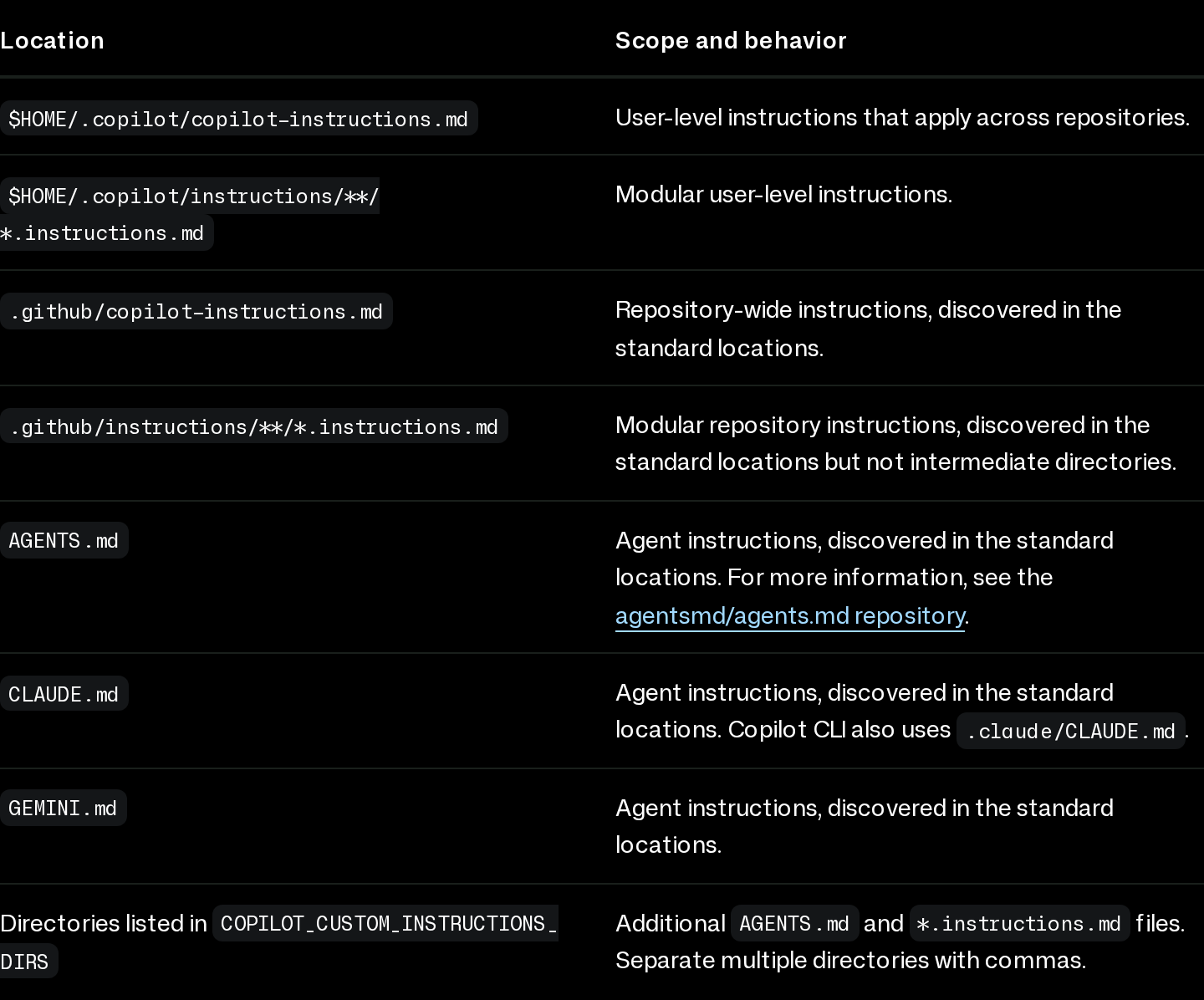
Copilot CLI looks in the most places, and its docs put them all in one table:
- Personal:
~/.copilot/copilot-instructions.md, plus optional modular files in~/.copilot/instructions/. - Project:
.github/copilot-instructions.md, and.github/instructions/**/*.instructions.mdfiles that apply only to paths matching theirapplyToglobs. - Other assistants’ files:
AGENTS.md,CLAUDE.mdandGEMINI.md, found in the repository root, the current directory, the directories between them, and directories on the path of a file Copilot is working on.
Copilot CLI combines everything it finds. It drops identical duplicate copies, but the docs define no precedence order between files, so two files that disagree both end up in context. Run /instructions in a session to see which files it found and switch single ones off. Edits don’t reach a running session: start a new one with /new, or resume with copilot --continue.
This is Copilot CLI. Copilot in VS Code documents its instruction files separately, so check the editor’s docs if that’s where you use it.
Claude Code: CLAUDE.md, and AGENTS.md when there’s none
Personal instructions go in ~/.claude/CLAUDE.md. In a project, Claude Code loads CLAUDE.md and CLAUDE.local.md from the working directory and every directory above it, and picks up the ones in subdirectories once it works with files there. CLAUDE.local.md is for notes you don’t commit; add it to .gitignore.
Claude Code also reads AGENTS.md (v2.1.277 or later), but by default only when there’s no CLAUDE.md, .claude/CLAUDE.md or CLAUDE.local.md in the working directory or above it. Your ~/.claude/CLAUDE.md doesn’t count for that check, so it keeps loading next to a project AGENTS.md. To read both kinds, open /config and set Project instructions to claude-md-and-agents-md.
Codex: AGENTS.md, one file per directory
Codex reads ~/.codex/AGENTS.override.md if it exists, otherwise ~/.codex/AGENTS.md, and uses only the first non-empty one. Then it walks from the project root (usually the git root) down to the current directory and takes at most one file per directory: AGENTS.override.md, then AGENTS.md, then any names in project_doc_fallback_filenames. Files are joined root first, so the one closest to you comes last. The combined size is capped by project_doc_max_bytes, 32 KiB by default.
The fallback list is how Codex reads a repo that only has a CLAUDE.md:
# ~/.codex/config.toml
project_doc_fallback_filenames = ["CLAUDE.md"]
OpenCode: AGENTS.md, with Claude Code fallbacks
OpenCode reads ~/.config/opencode/AGENTS.md in every session and looks for AGENTS.md from the current directory upwards. It also takes Claude Code’s files as fallbacks: a project CLAUDE.md when there’s no AGENTS.md, and ~/.claude/CLAUDE.md when there’s no ~/.config/opencode/AGENTS.md. The first match in each category wins, so with both files in a repo only AGENTS.md is used. OPENCODE_DISABLE_CLAUDE_CODE_PROMPT=1 turns off the ~/.claude/CLAUDE.md fallback.
For anything else, the instructions array in opencode.json adds files, globs or URLs, combined with your AGENTS.md.
For the rest of OpenCode’s files (opencode.json, tui.json or cli.json, and the data folder), OpenCode config file location on Linux, macOS and Windows shows what each file holds and what to keep out of git.
Gemini CLI: GEMINI.md file location
Gemini CLI loads ~/.gemini/GEMINI.md first, then GEMINI.md files in your workspace directories and their parents, then ones it finds when a tool opens a file in another directory. It concatenates all of them and sends them with every prompt. /memory show prints the combined text; /memory reload scans again.
The file name is a setting. To have Gemini CLI read the same AGENTS.md as the others, list it in context.fileName in settings.json:
{
	"context": {
		"fileName": ["AGENTS.md", "GEMINI.md"]
	}
}
Free-tier and Google One users were moved from Gemini CLI to Antigravity CLI on June 18, 2026, per the banner on the Gemini CLI docs. Antigravity’s migration guide says its CLI reads the same global ~/.gemini/GEMINI.md, plus GEMINI.md and AGENTS.md files in your project.
copilot-instructions.md and GEMINI.md vs AGENTS.md: who reads what
Put the project level side by side and one file reaches all five:
A project AGENTS.md is read by |
How |
|---|---|
| Codex | By default |
| OpenCode | By default |
| Copilot CLI | By default |
| Claude Code | If no CLAUDE.md file is found, or with the claude-md-and-agents-md setting, or via @AGENTS.md |
| Gemini CLI | Once you add it to context.fileName |
So in a repo, AGENTS.md is the shared format, and a tool-specific file only needs what’s specific to that tool. For Claude Code, the docs suggest a CLAUDE.md that imports the shared file on its first line, @AGENTS.md, with Claude-only notes below it.
Your home folder is where this falls apart. Each assistant reads its own personal file, and the only one that reads another assistant’s is OpenCode, with its ~/.claude/CLAUDE.md fallback.
Paste the same personal rules into ~/.claude/CLAUDE.md, ~/.codex/AGENTS.md, ~/.gemini/GEMINI.md and ~/.copilot/copilot-instructions.md, then edit one and forget the rest.
One AGENTS.md per repo for the team, and one personal file that every assistant reads in its own folder.
Keeping one set of personal instructions
On a single computer, symlinks do it. Keep ~/.claude/CLAUDE.md as the real file and point the others at it. OpenCode needs no link, because it already falls back to that file:
❯ ln -s ~/.claude/CLAUDE.md ~/.codex/AGENTS.md❯ ln -s ~/.claude/CLAUDE.md ~/.gemini/GEMINI.md❯ ln -s ~/.claude/CLAUDE.md ~/.copilot/copilot-instructions.md# ln refuses if a file already exists: merge it into CLAUDE.md, then move it aside# also move ~/.codex/AGENTS.override.md aside, Codex reads it insteadTwo things to keep in mind. Every assistant now reads every line, so a rule that only makes sense for Claude Code ends up in Codex too; keep the shared file tool-neutral. And the links live on this computer only: a laptop needs the same files and the same links again.
Then check that each assistant loaded what you expect:
❯ claude# run /context: your CLAUDE.md files are listed under Memory files❯ codex --ask-for-approval never "Summarize the current instructions."# Codex quotes the instructions it loaded❯ gemini# run /memory show to print the combined context❯ copilot# run /instructions to list the files Copilot CLI foundSyncing instructions files between computers
For more than one computer, you have two routes. A git dotfiles repo works: Dotfiles for AI coding assistants covers which files in ~/.claude, ~/.codex and ~/.cursor are safe to commit, and how Stow and chezmoi handle them. If Claude Code is the main one, the guide to syncing Claude Code settings between computers walks through the git setup and the alternative step by step.
The other route is SkillPouch, which we make. You keep your instructions once, in your pouch, and SkillPouch writes them into each assistant’s own file in its own folder, per the docs table:
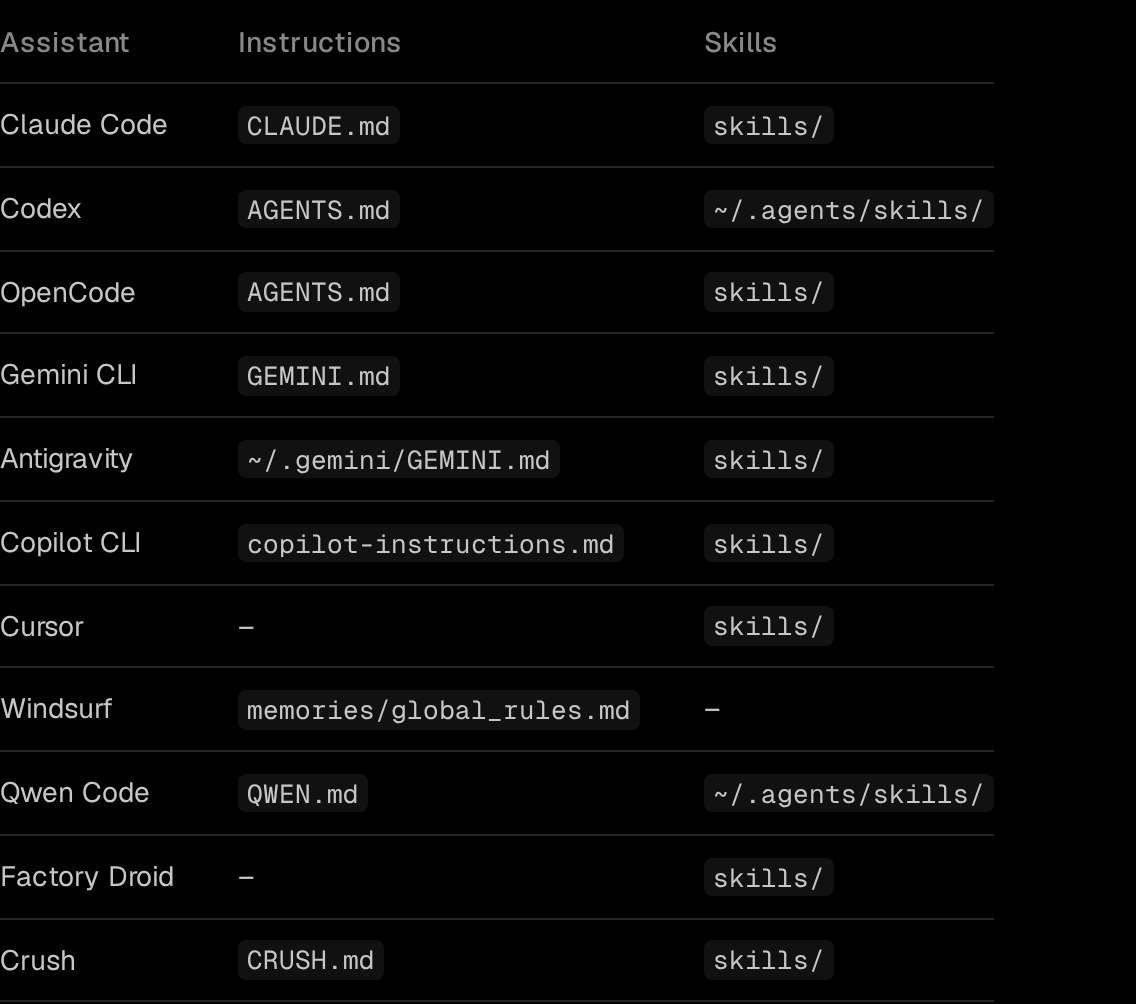
The same pouch syncs to your other computers, encrypted on your device before upload (security). Cursor and Factory Droid show a dash: SkillPouch writes no instructions file for them. Your project AGENTS.md stays in the repo, where it belongs. SkillPouch is not a backup either: as the background sync docs put it, a deletion or a mistake reaches your other computers too. To roll back, keep your own backup, such as a git repo.
- 1
Install and run it
npm i -g skillpouch, then skillpouch. Type the code it shows on the approval page, in a browser where you are signed in and unlocked, then choose Authorize.
- 2
Pick a pouch and assistants
Keep the assistants you use switched on. skillpouch select lists what this computer syncs.
- 3
Write your instructions once
Edit them in the web app. The background sync writes them into the instruction file of each assistant you switched on, on every computer that syncs the pouch.
Whichever way you go, run the checks above after the first sync. It takes a minute and tells you exactly which file each assistant read.
Try it on your own setup
Free to start, end-to-end encrypted, open source. Two commands and your setup follows you.