You want to change a Qwen Code setting, add an MCP server or move your setup to a new laptop, and first you need to find the file. The Qwen Code config location is easy to state: your personal setup lives in one folder, ~/.qwen, a project can add its own .qwen/ folder, and admins can add two system files around both.
The Qwen Code config folder: ~/.qwen
Qwen Code keeps your user settings in ~/.qwen/settings.json, as the settings docs put it. So the path per system is:
| Where | Qwen Code settings.json location |
|---|---|
| Linux | ~/.qwen/settings.json |
| macOS | ~/.qwen/settings.json |
| Windows | %USERPROFILE%\.qwen\settings.json |
| One project | .qwen/settings.json in its root |
The docs write the user path as ~/.qwen/settings.json, where ~ is your home folder; on Windows that is %USERPROFILE%.
Two admin files bracket them: a system defaults file that sits just above the built-in defaults, below your user settings, and a system settings file that overrides your user and project settings. Each has its own path per operating system:
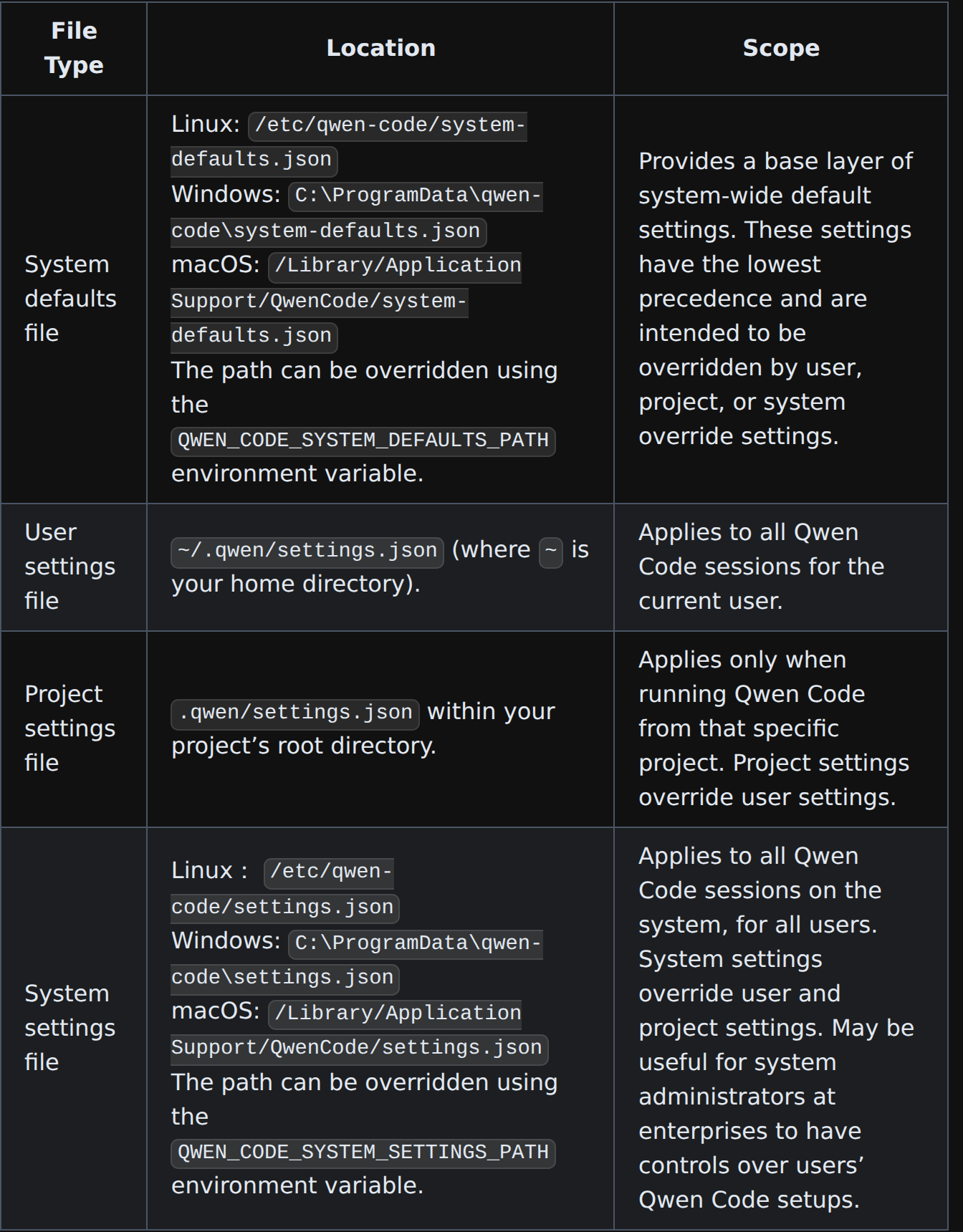
The two system paths can be moved with QWEN_CODE_SYSTEM_DEFAULTS_PATH and QWEN_CODE_SYSTEM_SETTINGS_PATH. When the same key is set in several places, the docs give the order, lowest to highest: default values, system defaults file, user settings, project settings, system settings, environment variables, then command-line arguments.
What’s in ~/.qwen
A full folder looks like this. You won’t have all of it, only the parts you use:
~/.qwen/
├── settings.json                 # models, auth, env, UI, tools, MCP servers, hooks
├── QWEN.md                       # your personal instructions, for every project
├── .env                          # API keys, if you keep them out of settings.json
├── agents/                       # subagents as Markdown files
├── commands/                     # custom slash commands
├── skills/<name>/SKILL.md        # personal skills
└── projects/<project>/memory/    # auto-memory that Qwen Code writes itself
A project mirrors most of it in a .qwen/ folder at its root: .qwen/settings.json, .qwen/agents/, .qwen/commands/, .qwen/skills/ and a .qwen/.env.
❯ ls -a ~/.qwen# -a also lists .env, if you created one❯ ls -a .qwen# the project layer, run from the project rootQwen Code settings.json: what goes in it
The settings docs group settings.json into top-level sections such as general, ui, model, context, tools, mcp and security; proxy stays a key at the root. The model part is the one the authentication docs show in full, here without the key and the description line:
{
	"modelProviders": {
		"openai": [
			{
				"id": "qwen3.8-max",
				"name": "qwen3.8-max (QwenCloud)",
				"baseUrl": "https://maas.qwencloudapi.com/compatible-mode/v1",
				"envKey": "QWENCLOUD_API_KEY"
			}
		]
	},
	"security": { "auth": { "selectedType": "openai" } },
	"model": { "name": "qwen3.8-max" }
}
modelProviders declares which models exist and how to reach them; its keys (openai, anthropic, gemini) are the API protocol. security.auth.selectedType tells Qwen Code which protocol to use on startup, so you don’t have to run /auth. envKey names the environment variable that holds the key, which means the key itself doesn’t have to be in this file. More on that below.
MCP servers and hooks are in settings.json too
There is no separate MCP file. Per the MCP docs, servers go under mcpServers in settings.json: user scope in ~/.qwen/settings.json, project scope in .qwen/settings.json. qwen mcp add writes them for you and uses the user scope unless you say otherwise:
❯ qwen mcp add <name> <commandOrUrl> [args...]# user scope (the default): goes into ~/.qwen/settings.json❯ qwen mcp add -s project <name> <commandOrUrl> [args...]# project scope: goes into .qwen/settings.json in the project rootHooks sit under a top-level "hooks" key in the same settings files, keyed by event names such as PreToolUse. Run /hooks in a session for a read-only list of the hooks that session runs.
QWEN.md: personal and project instructions
Instructions live in QWEN.md. The memory docs list three places, and Qwen Code loads all of them when a session starts:
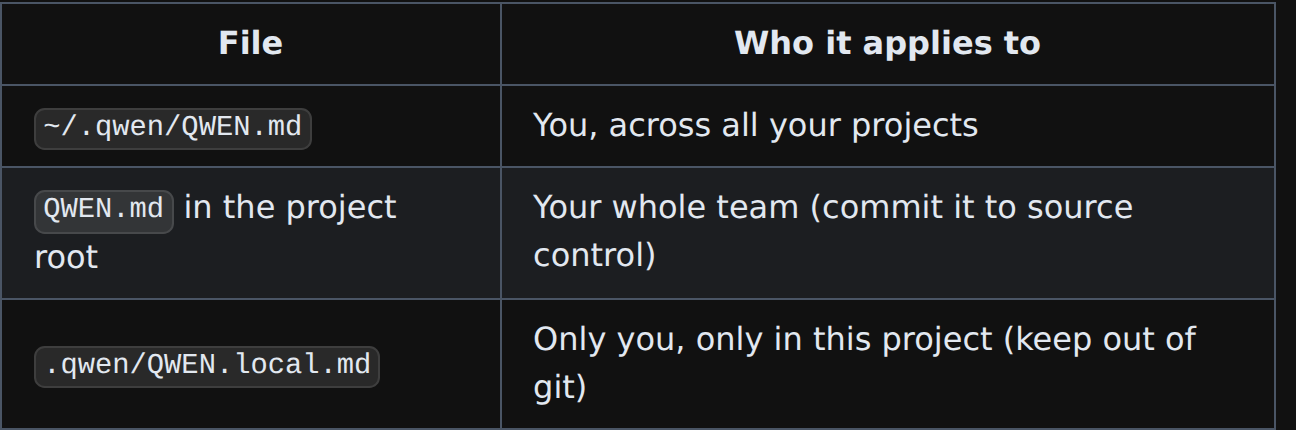
If the repo already has an AGENTS.md for other tools, Qwen Code reads that too, so a project doesn’t need the same rules twice. /memory opens a panel where you can open the personal or project QWEN.md. Auto-memory, what Qwen Code learns about you on its own, is kept apart from both, in ~/.qwen/projects/<project>/memory/.
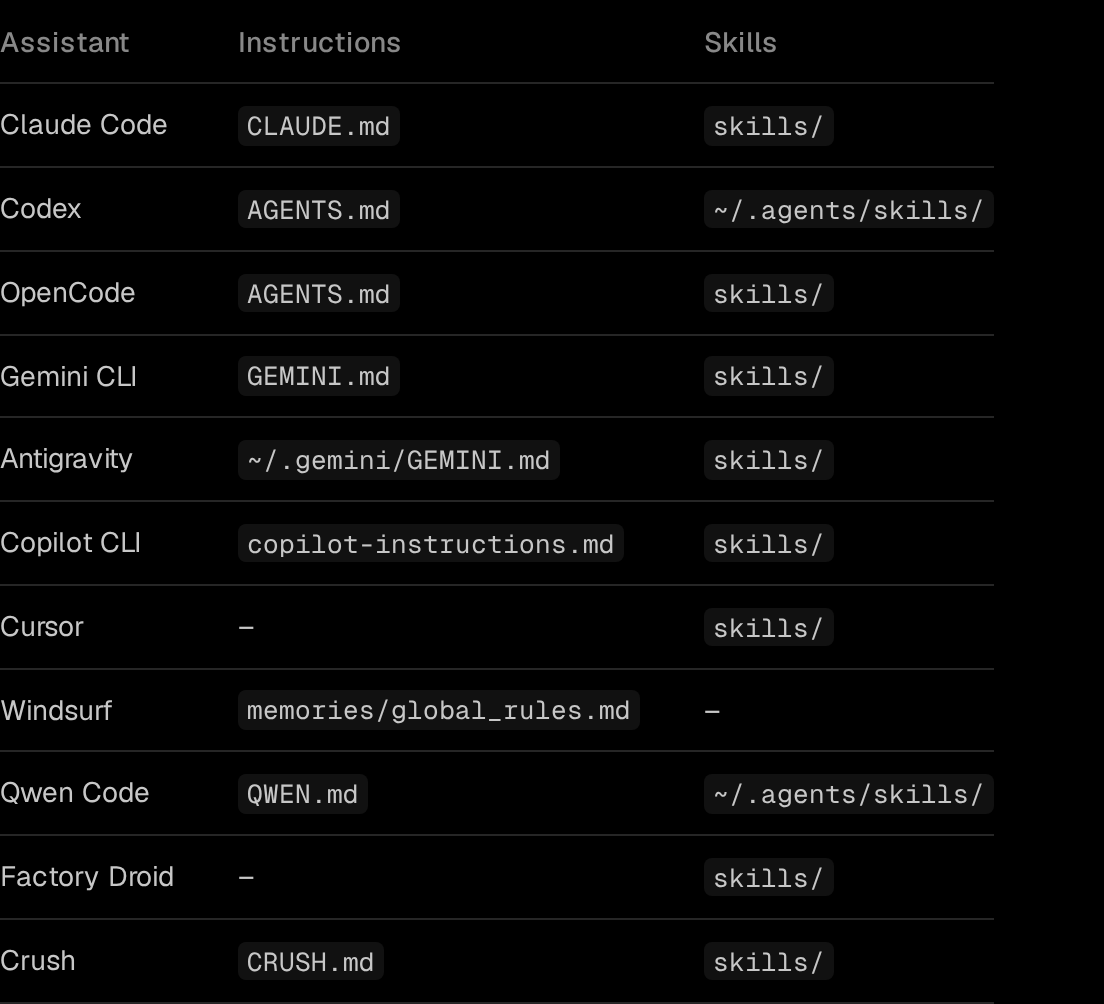
For where Claude Code, Codex, OpenCode, Gemini CLI and Copilot CLI read their instructions, see instructions file locations.
Skills: ~/.qwen/skills and the shared ~/.agents/skills
Qwen Code reads personal skills from two folders, per the skills docs: ~/.qwen/skills/ and ~/.agents/skills/. Each skill is a folder with a SKILL.md. Projects get the same pair, .qwen/skills/ and .agents/skills/, and skills.directories in settings.json adds more folders that load as personal skills.
| Two skills with the same name | Which one Qwen Code uses |
|---|---|
In ~/.qwen/skills/ and ~/.agents/skills/ |
~/.qwen/skills/ |
In .qwen/skills/ and .agents/skills/ |
.qwen/skills/ |
| Project and personal | The project one |
Beyond that, the first one found wins in this order: project, personal, extension, then bundled skills.
~/.agents/skills/ is the interesting one. Codex reads it as well (SkillPouch docs), so a skill you drop there is picked up by both assistants without a copy. The catch is the name rule above: a skill with the same name in ~/.qwen/skills/ hides the shared one from Qwen Code, and you end up editing a skill that Qwen Code never loads.
Agents and commands
Subagents are Markdown files with YAML front matter: name and description up top, the system prompt below. The subagents docs put personal ones in ~/.qwen/agents/ and project ones in .qwen/agents/, and the project one wins.
Custom slash commands live in ~/.qwen/commands/ for every project and .qwen/commands/ for one. The commands docs say commands now use Markdown with optional YAML front matter, and that TOML “is deprecated but still supported for backwards compatibility”. Subfolders become namespaces, and {{args}} takes the arguments:
- 1
~/.qwen/commands/test.md
Becomes /test, in every project.
- 2
.qwen/commands/git/commit.md
Becomes /git:commit, in this project only.
- 3
{{args}} in the body
Where the command's arguments are injected.
Which Qwen Code files are safe to commit
Two files can hold API keys. .env is one. The other is settings.json itself, because its env section can hold keys as a lowest-priority fallback; the auth docs add that settings.json “may be shared or synced” and to prefer .env files for secrets.
| File | Put it in git? |
|---|---|
QWEN.md (project root) |
Yes, it’s meant for the team |
.qwen/settings.json |
Yes, as long as env holds no keys |
.qwen/agents/, commands/, skills/ |
Yes |
.qwen/QWEN.local.md |
No, it’s yours |
.qwen/.env |
No, it holds project secrets |
~/.qwen/settings.json |
Only with no keys under env |
~/.qwen/.env |
No |
"QWENCLOUD_API_KEY": "sk-..." under env in ~/.qwen/settings.json, then the folder pushed to a dotfiles repo.
The key in ~/.qwen/.env, and settings.json only names it with "envKey": "QWENCLOUD_API_KEY".
Moving ~/.qwen to a second computer
The do-it-yourself route is a git repo for ~/.qwen, with .env, projects/ and any keys in settings.json left out. Dotfiles for AI coding assistants covers that setup with Stow and chezmoi. Remember ~/.agents/skills/ too, since it sits outside ~/.qwen.
The other route is SkillPouch, which we make. It knows where Qwen Code keeps each part:
Per the assistants docs, it syncs QWEN.md, skills, agents/ and commands/, the MCP servers and hooks in settings.json, and the settings themselves: model providers and protocol, environment, auth, model, general, UI, tools and proxy. SkillPouch gives Qwen Code a converted TOML copy of each command instead of a link (Qwen Code still loads TOML commands), and brings edits to the copy back into the pouch before each sync. The CLI encrypts pouch content before upload (security); secret values stay in your pouch but are removed from share links (assistants).
- 1
Install and log in
npm i -g skillpouch, then skillpouch. Type the code it shows on the approval page in a browser where you are signed in and unlocked, then choose Authorize.
- 2
Keep Qwen Code switched on
Pick a pouch and the assistants this computer syncs. skillpouch select lists the current choice.
- 3
Check the settings it carries
skillpouch settings list qwen-code shows each synced entry. skillpouch settings exclude stops syncing one entry on this computer; the pouch keeps it.
One honest limit: sync is not a backup. As the background sync docs put it, a deletion or a broken edit reaches your other computers too, so keep your own backup if you need to roll back.
Whichever route you take, start qwen on the second computer and open /memory and /hooks. They show whether your QWEN.md and hooks made it across.
Try it on your own setup
Free to start, end-to-end encrypted, open source. Two commands and your setup follows you.